 MY BOWLING JOURNEY
Journal gathers every note you've written, newest first, so you can look back at what you were working on and what you said about it.
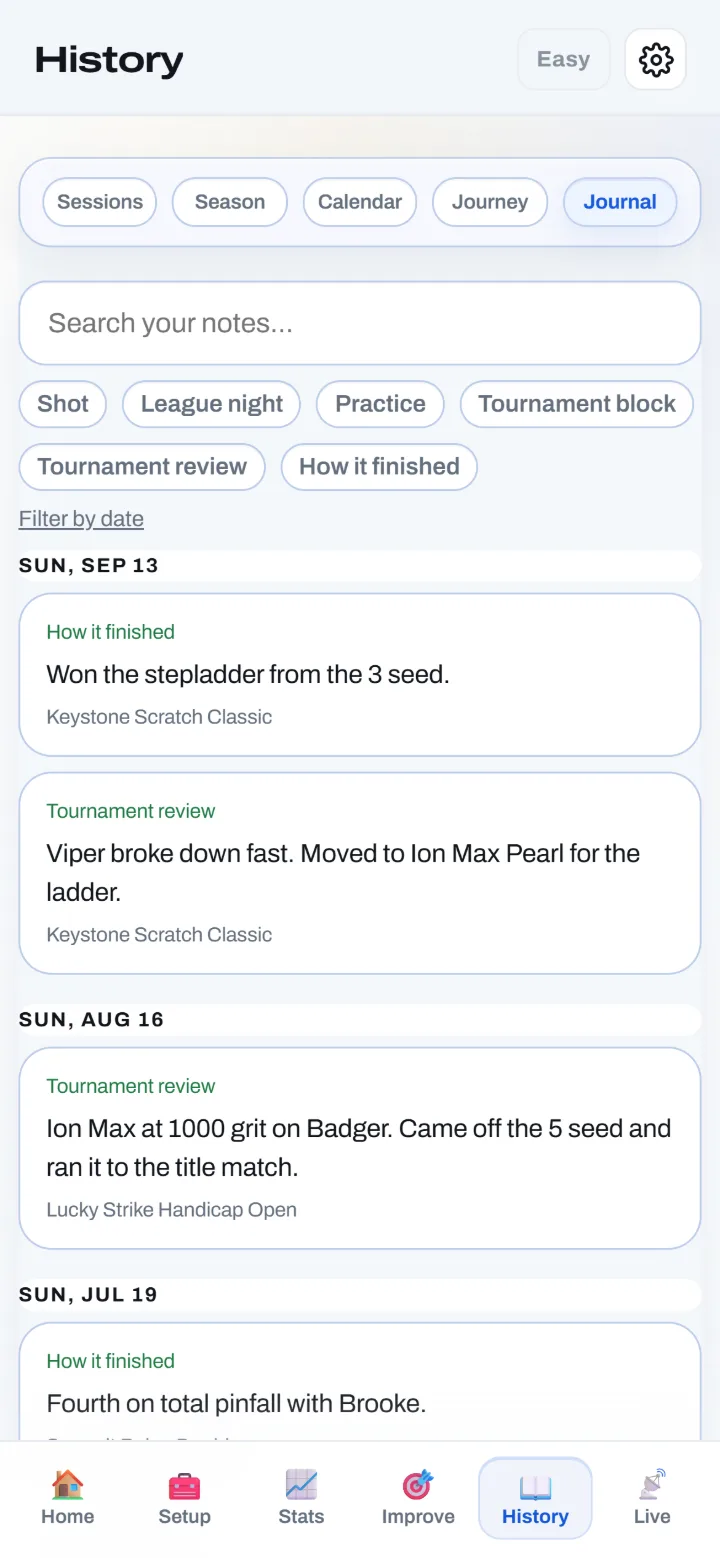
What's in it
Notes are grouped by date. Each one says what kind of note it is, then your words, then the league or event under it.
- Shot: a note on one ball, from Details while you score. Beside it: the game and frame, the ball, the leave and whether you made the spare, like "Game 2, frame 6".
- League night: a night's Session Notes, with that night's games beside it.
- Practice: a drill's note, with its target and how many you made.
- Tournament block: a block's Day Notes, with the day, squad and games.
- Tournament review: a tournament's Tournament Notes.
- How it finished: the note you added to how a tournament finished.
Open bowling and Lane pattern notes show only if you have some from older versions of the app.
The journal only reads your notes. To change one, change it where you wrote it. See Notes on a night.
Find a note
- Type in Search your notes…. It looks in your notes, the line beside each one, the league or event, and the date written as year, month and day, like 2026-09-24.
- Tap note types to show only those. Tap more than one to see several kinds. Tap one again to take it off.
- For a range of dates, tap Filter by date and fill in either date, or both.
While a type or a date is on, the line says how many notes you're seeing out of all of them. Clear takes the types and dates off.