 MY BOWLING JOURNEY
An event with A cut, then more on Set up has a Cut stage after qualifying. The cut card also shows on the last squad or block while you bowl, so you can see where you stand game by game.
Typing the cut line
Cuts are posted as pins over or under 200 a game, so that's how you type them.
- On the cut card, tap Update.
- Tap the plus or the minus, then type the pins. A cut posted at plus 150 is + and 150.
- Tap Done.
On the Cut stage the box is already open when no line is in yet.
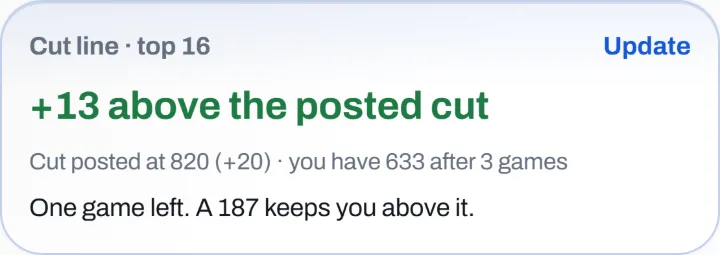
The card then says where you are, like "+38 above the posted cut" in green or "12 below the posted cut" in red. Under it, the line as a total and your pins so far, like "Cut posted at 1,750 (+150) · you have 1,788 after 8 games".
- The line is measured against the games you've bowled so far, at 200 a game plus the posted pins.
- In a handicap event it's your pins with handicap, since that's the sheet the cut is posted on.
- With Pins carry over, the earlier blocks count in.
- In doubles and team events, and when only the best games count, it's 200 for each game that counts, every bowler's.
What it takes from here
With games still to go, a line says what you need to average to stay above it, like "Two games left. A 182 average from here keeps you above it." It may say "You're above it whatever you bowl from here." or "Out of reach: it would take more than 300 a game." When only the best games count, there's no such line, because which games drop isn't known yet.
Did you make the cut?
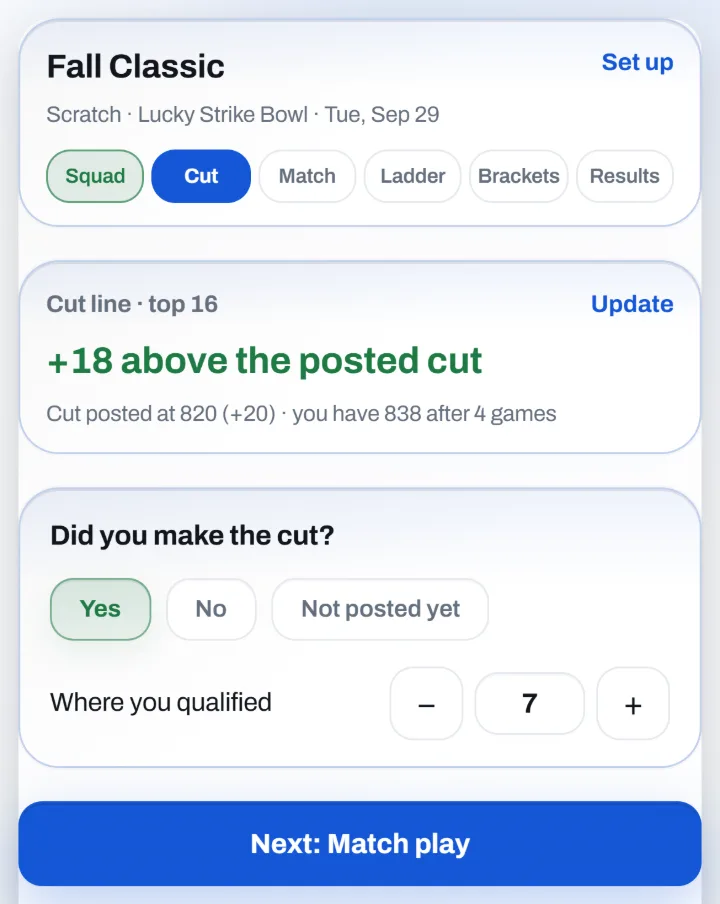
On the Cut stage, tap Yes, No or Not posted yet.
- When the line is in and every game is bowled, the app picks the answer the numbers give. Tap another to change it. Your answer is kept.
- Yes: Where you qualified asks your place (Where your team qualified for doubles, team and Baker). It shows across the app, like "Made the cut, 5th of 8".
- Then tap the button under the card, like "Next: Match play", to go on.
- No: tap Next: Results. The stages after the cut stay gray and show as "Not reached" on Results.
- Not posted yet: leave it and come back when the sheet goes up. Results says the cut is "Not posted yet" until you answer.
The ladder cut
When a stepladder comes after match play, match play has a cut of its own. It's typed there as a posted total, not pins over 200. See Match play.