 MY BOWLING JOURNEY
Some bowlers are on a team in two leagues, or sub for a couple of teams in one. The app keeps each night with the team you bowled it for.
Being on more than one team is part of Pro. The free plan covers one team, a team you sub for included. Joining another stops with "The free plan covers one team, and you're already on one. Joining another is part of Pro."
Looking for how to score a sub on your own team? That's Scoring for your team and for subs.
One team, or a sub, in each league
In any one league, you're either:
- on one team, your own team, and on no other team in that league, or
- a sub for as many teams as you like in that league.
Not both. Your own row on a team's roster says which: Sub off for your own team, Sub ✓ for a team you sub for (Setup > Team > My teams). Setup marks every team you're on Your team, with Sub beside it on a team you sub for.
What that means:
- On a team in a league, you can't join, ask to join or make another team there: "You're on Spare Me the Details in this league, so you can't sub for another team here."
- Subbing in a league, you're a sub on any team you join or make there too.
- Taking Sub off your own row while you're on another team in that league is refused, like "You sub for Spare Me the Details in this league. Leave that team to be a full member of this team." With several, it says "Leave those teams".
In different leagues, you can be on a team in each one.
Which team are you bowling for tonight?
When more than one of your teams shows in tonight's league, Set up asks Which team are you bowling for tonight? Each team has its own chip, with the league under its name.
- On Home, tap League and stay on Set up.
- Tap tonight's team.
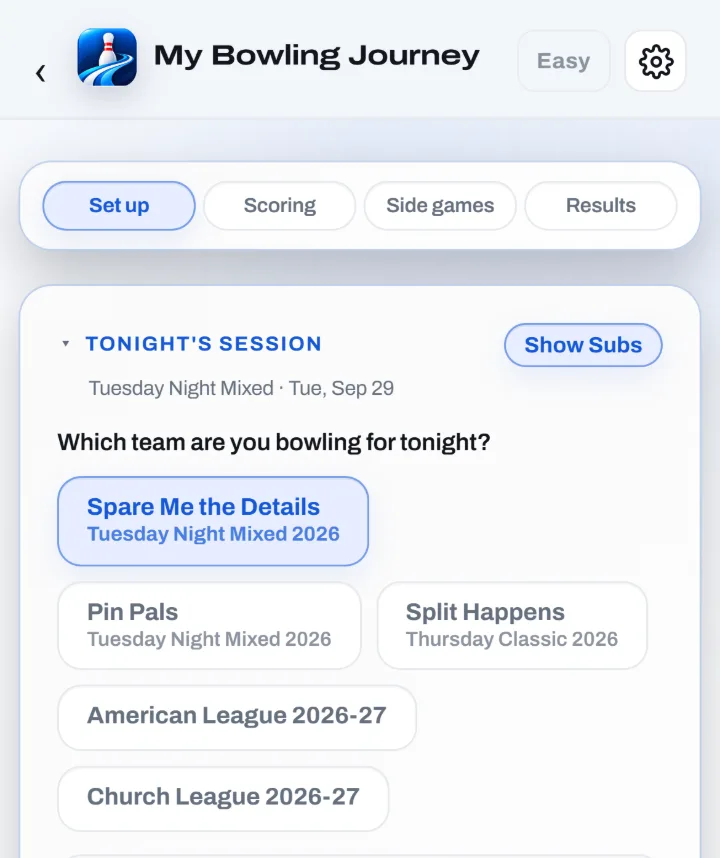
The app lights one for you to start: a night you've already started keeps its team; then the team you picked for tonight; then your own team in the league; then the team you bowled for last in that league. One tap changes it before you start.
Once you've scored a frame or a game tonight, the night belongs to that team. Set up shows only that team's chip in the league until the night is saved. Next week starts fresh.
Show Subs
If you sub for a team in a league Set up offers, a Show Subs chip sits at the top right of Tonight's Session. It's lit, and the teams you sub for are on the chips, until you turn it off.
- Tap it to hide every team you sub for. Tap again to bring them back.
- Your own team always shows.
- A league where you only sub leaves Set up while they're hidden.
- Hiding changes Set up only. Those teams keep their nights, their stats and Live.
- A night already under way shows its team either way.
Where each night goes
Tonight's frames, game scores and points go to the team you picked. On Live, the other team's board shows you as "Bowling for Spare Me the Details tonight."
How the nights count in Stats
- Mine counts every night you bowled, for every team.
- Nights in a league where you only sub stay out of your combined average across leagues. They're in your history and in that league's own average. If they're all you have, they are your average.
- Team lists only the teams you're on as a full member, not the ones you sub for. Each team's cards count only the nights bowled for that team. See The Team chip.
- Viewing and Compare To on Mine leave out a league where you only sub. See Viewing and Compare To.
The league night reminder is off for a league you sub in, unless you turn it on. See Turning on reminders.