 MY BOWLING JOURNEY
Most Share buttons send a picture: your numbers on a card in the app's colors and your language, with the app's logo, name, web address and QR code at the bottom. Sharing is free. Only the Average Sheet, which is Pro, needs Pro to share.
How sharing works
- Tap a Share button. It says Preparing… while it draws the picture.
- Your phone's share sheet opens with the picture and one line, "Tracked with My Bowling Journey · https://mybowlingjourney.com".
- Pick where it goes: a text, a chat, a post, or save the picture.
The button says Shared when it's done.
On a computer or a browser that can't share pictures, the app sends the full message as text instead, or shows the picture with "Press and hold the card to save or share it." and the buttons Copy text and Close. If all it can do is copy, the button says Copied. Paste it anywhere.
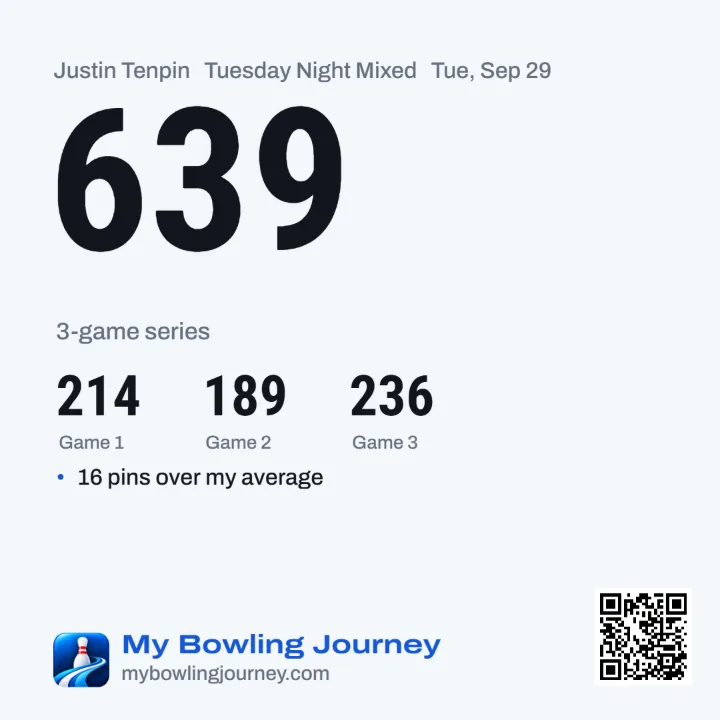
Every Share button
| Button | Where | What it sends |
|---|---|---|
| Share tonight | A league night's Results | Your name, the league and date, your series big, each game, and up to three highlights: side game money you won, a new best series, pins over your league average, a strong strike or spare rate. Badges you earned tonight too. |
| Share the scorecard | View Scorecard on Results | Each game's ten frames, like the center's sheet. See Viewing the scorecard. |
| Share it | The big celebration card, after a 300, an 800 or your first 700 | Your games on the same card as Share tonight. See Celebrations and personal bests. |
| Share this practice | A practice's Results | Your practice games, how they sat against your average, how many drills, and your accuracy. See Practice Recap and Drill Recap. |
| Share the night | Open bowling's Results | Your games, the night's winner and best game, and badges you earned. |
| Share standings | Open bowling's Standings | The top ten you've bowled with, by average, with their games. |
| "Send (name) their badges" | Open bowling's Standings | A picture of the badges that friend has earned on your scoresheet. See Open bowling Results and Standings. |
| Share this tournament | A tournament's Results, under How it went | How you finished, your pins, games and average, a line for each stage you bowled, and what you won. |
| Share | The Weekly Recap and Monthly Recap | Your week or month: each kind of bowling's average against your season, and your best game. See The Weekly Recap. |
| The share icon on a stats card | Stats | The card as it is on your screen, with its name and whose numbers it shows above it. The "?", star, share and hide icons are left out. |
| Share this trend | Stats > Trends | The trend line, with its High, Average and Low. |
| Share my badges | Your badges | Your earned badges, newest first, and how many of the collection you have. See Badges. |
| Share the sheet | The Average Sheet (Pro) | Your season's averages on one page, for a tournament desk. See The Average Sheet. |
| Share your review | A Season or Year in Review | Your season or year on one card. See Season and Year in Review. |
| Share Summary | History > Season | Text only, no picture: nights and games, average, high game and series, games over 200, strike and spare rates, and the season's money. |