 MY BOWLING JOURNEY
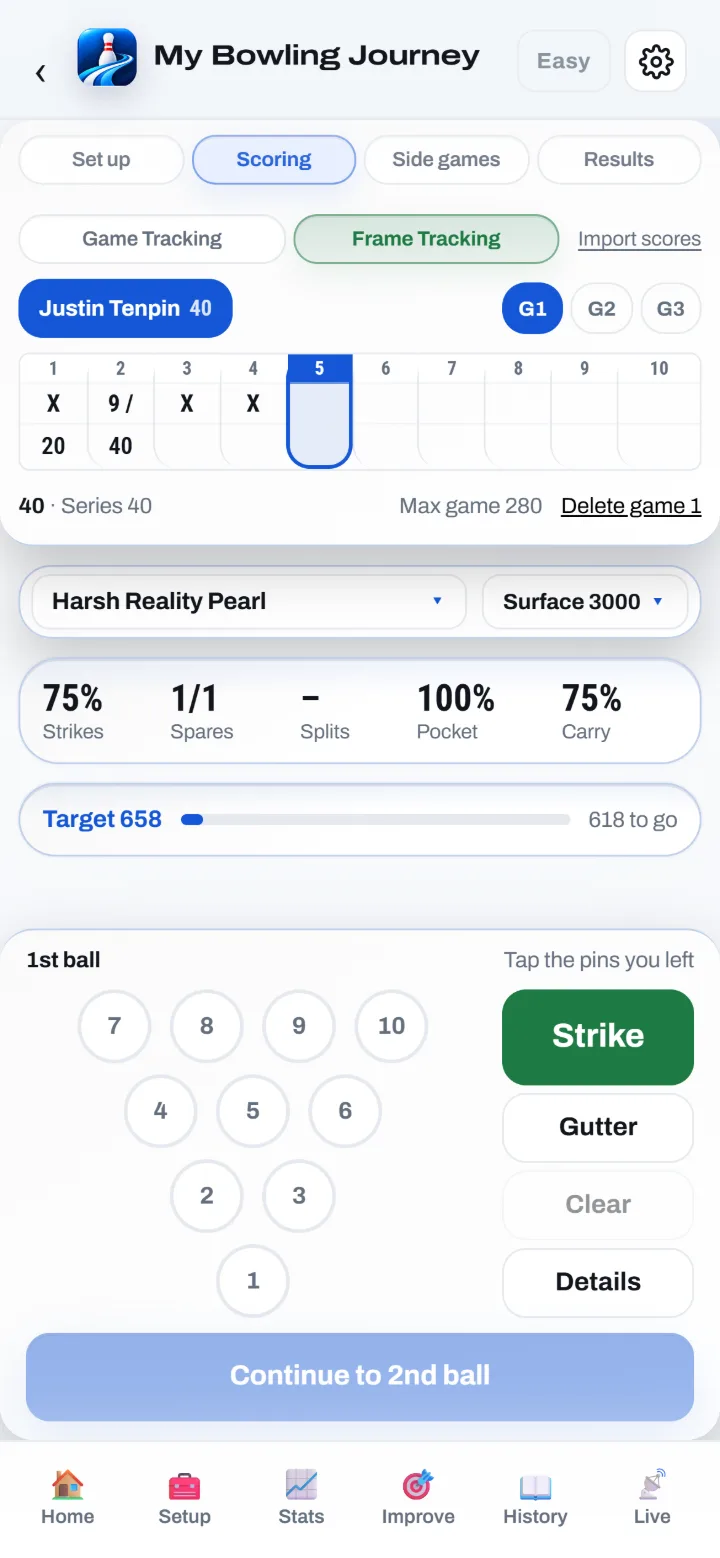
On Frame Tracking, the pin deck sits at the bottom of Scoring: the ten pins as they stand, four buttons beside them, and a big button under them. You score each ball by tapping what happened, and the scoresheet at the top fills in as you go.
The first ball
The line over the pins says 1st ball and Tap the pins you left.
A strike: tap Strike. That's it: the frame is saved and the deck moves to the next frame.
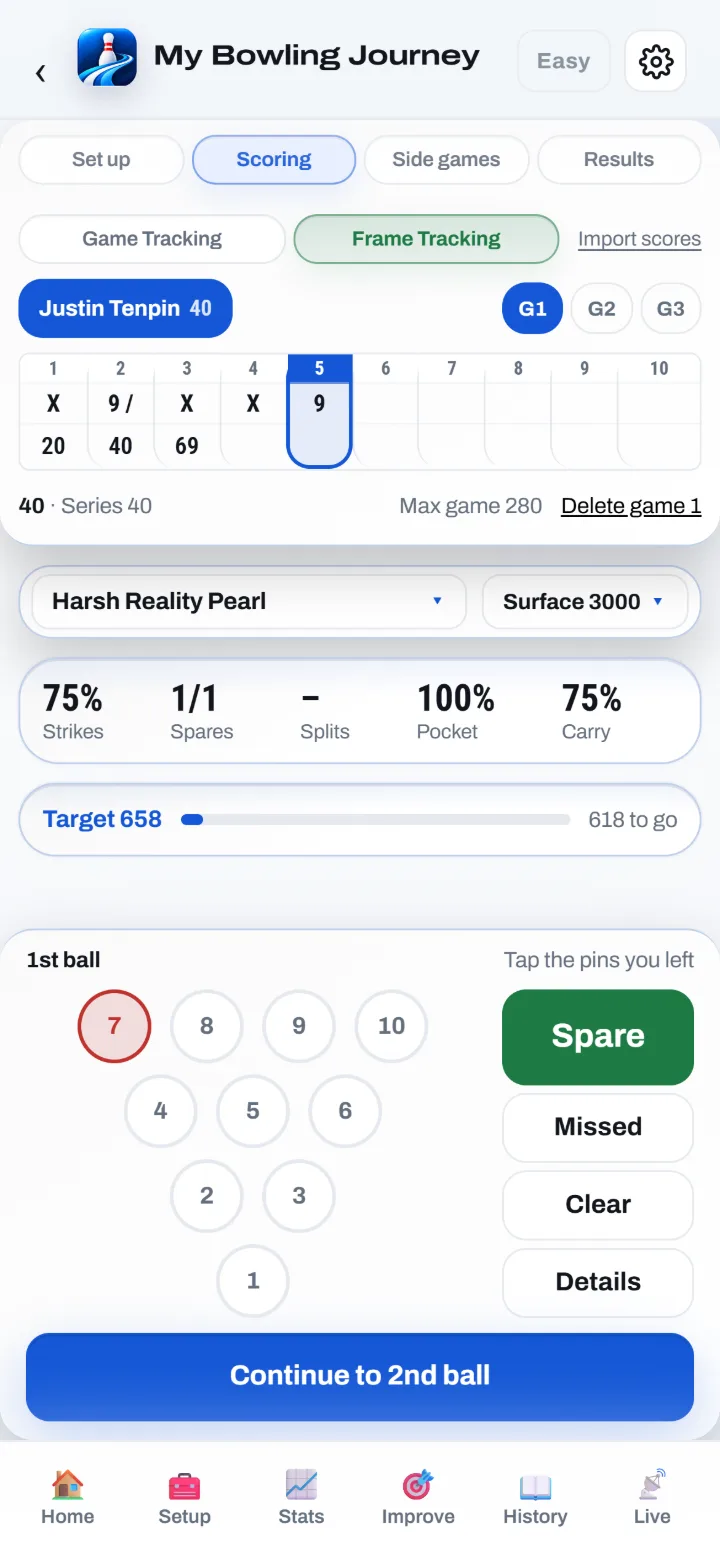
Pins left standing:
- Tap each pin that's still standing. It turns red. Tapped the wrong one? Tap it again.
- The buttons change: Strike becomes Spare, Gutter becomes Missed, and the big button reads Continue to 2nd ball.
- Tap Continue to 2nd ball to enter your second ball.
Or skip the second step:
- Picked them all up? Tap Spare instead. The frame is saved as a spare.
- Left one pin and missed it? Tap Missed. The frame is saved as 9 and a miss. With two or more pins left, Missed waits for the second ball.
A gutter ball: tap Gutter. All ten stand, and the deck goes straight to the second ball.
Start over: Clear takes back the pins you tapped.
The second ball
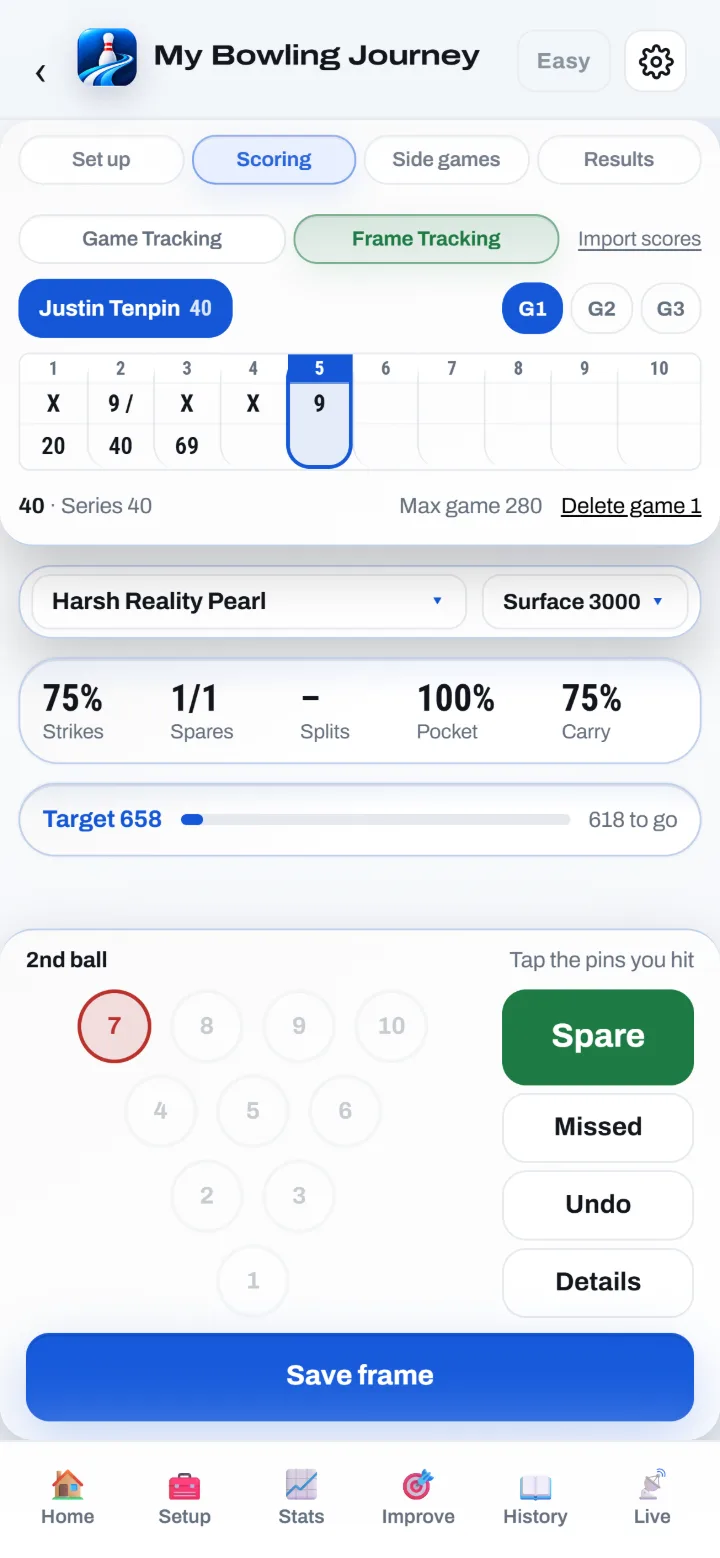
The line says 2nd ball and Tap the pins you hit. Only the pins you left can be tapped; the rest are faded.
- Spare: you got them all. The frame is saved.
- Missed: the frame is saved. Pins you've already tapped as hit stay down. With the 2-4-5 left, tap the 2 and the 4, then Missed, and it's the 5 you missed.
- Knocked some down? Tap the pins you hit, then Save frame.
- Save frame with nothing tapped saves a miss: every pin you left is still standing.
- One pin left: tapping it makes it a spare (tap again for a miss), then Save frame.
- Undo takes back the pins you tapped on this ball. With none tapped, it goes back to the first ball.
After each ball
- The big button shows ✓ Saved for a moment.
- The deck always moves to the first ball you haven't entered. There's nothing to step through.
- For your own balls, the details sheet may come up after a strike or a finished frame. Details beside the pins opens it for your latest ball. See Details.
- When the night's last game is done, the night is saved and Results opens. See Saving and finishing.
Splits and other leaves
When the pins you tap make a split, the deck names it in red over the pins: Baby split, Big four or Greek church when it has a name, otherwise just Split (a 7-10 shows as Split). It also names a Bucket (the 2-4-5-8) and a Washout.
The app calls a leave a split when the headpin is down, at least two pins are standing, and either:
- two or more pins stand in one row with nothing standing in front of them, like the 7-10 or the 4-6; or
- a whole line of pins from front to back is down between two pins that are standing, like the 3-10 (the 6 is gone) or the 5-7.
A washout has the headpin standing: for a right-hander, the 1 with the 6 or 10 (or both) and the 3 knocked down. A left-hander's is the mirror: the 1 with the 4 or 7, and the 2 down.
Splits count on their own. Your spare figures leave them out, and the Splits number counts them instead.
The corner pin: Weak 10 or Ringing 10
When the only pin you leave is the 10, two buttons come up beside the pins: Weak 10 and Ringing 10. A left-hander's corner pin is the 7, so they read Weak 7 and Ringing 7.
- Tap one to say how it stood. Tap it again to take it back.
- They're optional. The frame saves without them, and it counts as a corner pin left either way.
- They're only for your own balls, not a teammate's.
9-pin no-tap
In a 9-pin no-tap league, nine down on a full rack is a strike. Tap the one pin left, then Save frame. There's no second ball.
The scoresheet at the top
- Who you're scoring: your name with the game's score. Scoring teammates too? Up to three bowlers get a chip each; tap one to score them. Four or more share one Scoring list instead. See Scoring for a team.
- G1, G2, G3: tap one to look at that game. The deck stays on the next ball to bowl.
- The ten frames: the frame you're on is outlined. Tap a frame you've bowled to fix it. See Fixing a frame or game.
- The line under the frames: tonight's games and series, like "238 · Series 238".
- Max game: the most you can still score this game if you strike out from here. It's 300 before your first ball. It shows only for the game you're bowling, and not for a game with a typed score.
- Max series: on a league night, in the league's last game (game 3 of 3, game 4 of 4), once the earlier games have scores: those scores plus this game's max.
- Delete game 1: deletes that game for the bowler on the chip, after asking. See Fixing a frame or game.
How many G chips you get is your league's games per night, set in Setup > League.
The ball and surface
The line above tonight's numbers is the ball you're throwing and its surface. They stay picked from frame to frame until you change them. How to pick them: Details: ball, surface and where the ball went.
Tonight's numbers
Under the ball, five numbers for tonight, for the bowler on the chip:
| Number | What it counts |
|---|---|
| Strikes | Strikes out of first balls at a full rack, the 10th frame's fresh racks included. |
| Spares | Spares made out of spares tried, splits left out. |
| Splits | Splits made out of splits left. |
| Pocket hits out of first balls at a full rack. | |
| Carry | Pocket hits that struck, out of pocket hits. |
- A pocket hit is a strike (unless you marked it a Brooklyn), or, for a right-hander, a single 4, 5, 7, 8, 9 or 10 left, or the 4-9 or 8-10. A left-hander's are the mirror.
- If you answered Why didn't it strike? in the details sheet, your answer wins: Didn't carry is always a pocket hit, and Light, High and Brooklyn never are.
- Carry turns amber when tonight's carry is 10 points or more under your carry in this league this season (once the season has 10 pocket hits).
- In a 9-pin no-tap league, nine on a full rack counts as a strike here too.
The Goal bar
On a league night, under tonight's numbers: "Goal 658", a bar, and how many pins to go. The bar is your series so far, counting the game you're bowling.
- Pro: the goal is the one you typed on Set up for tonight, or else the app's suggestion. See The Set up screen.
- Free: your average in this league this season times tonight's games, the same goal Set up shows. With no average there yet, the row shows Tonight's Goal and See what Pro adds.
- Once you're there it says Goal reached, and the app celebrates the first time you pass it that night.
- With a teammate on the chip, it shows their own figure, not your typed goal.
Shot Recall (Pro)
A thin strip on top of the deck, Shot Recall, shows the last ball you threw at a full rack on this lane tonight: where you stood, your target, where it crossed, how it hit and what it left, from what you entered in the details. It shows while there's a ball to bowl. On a short phone it can be the Recall button at the bottom left of the deck instead: hold it to read the same line, and let go to hide it.
On a short phone
Held upright, the pin deck always shows whole, with every pin big enough to tap. When the screen is short, other parts make room first, one at a time, stopping as soon as the deck fits:
- The Goal bar goes, and its number shows as "Goal 658": beside your name, or, when you're keeping score for teammates, on the top line of the pin deck in place of the hint.
- The ball line goes. The ball sits at the bottom left of the pins, above the big button, and tapping it opens the ball and the surface.
- On Android, with a Display size or font size above 115%, the pins and the text on Scoring stay the size they are at 115%. Your phone's own settings don't change.
- Tonight's numbers move to the top of the Details sheet.
- Shot Recall becomes the Recall button.
If there still isn't room, the deck stays at the bottom and the rest of the screen scrolls above it.
Collapsing the deck: tap ▾ at the top right of the deck and it shrinks to one row: Strike, Pins, Details and the big button, and everything that moved comes back. Tap Pins to bring the whole deck back. The app keeps your choice on this phone until you change it.
Turned sideways: the screen fits without scrolling, as before. When it's short, tonight's numbers go to one line, the Goal bar goes, and then the deck becomes one row on its own. Tap Pins to open the whole deck over the screen.